The AI Personal Assistant Era Just Arrived. So Where Do I Begin?
OpenAI just validated personal AI agents. Everyone's buying Mac minis and spinning up OpenClaw. But the hard part isn't building. It's knowing what to build. Here's how product thinking helps you escape the AI productivity trough.

TL;DR: Personal AI agents are here. To avoid the seduction of being able to build anything, apply product thinking: start with specific friction in your life, build the smallest useful thing, and see if it changes your behavior. One loop that works beats ten impressive demos.
OpenAI just acqui-hired Peter Steinberger, the developer behind OpenClaw, that side project where you text an AI that actually does things for you. Sends emails. Books restaurants. Manages your calendar. Acts on your behalf.
Meanwhile, people are selling out Mac minis at hardware stores to run personal AI agents at home.
If you're a knowledge worker watching this unfold, it's hard not to feel two things at once:
- Excitement that this could be the most empowering shift in personal software since the smartphone
- And a creeping sense of… okay, but what do I actually do with this?
I keep getting some version of that question. Friends, coworkers, people who read my recent post about building a personal AI assistant with Claude Code. They get it set up, they see the potential, and then they stare at the prompt and go: "Now what?"
I think the answer is simpler than people expect. But it requires a mindset shift that most of us aren't used to.
First, a confession
I've never had more AI tools available, and I've never felt more behind.
Every morning I open my laptop to a growing stack of AI-generated docs, posts, proposals, and articles. Not just from my own systems, but from everyone around me. Documents that were produced in minutes but still take the same amount of human attention to evaluate.
I'm not alone in this. Harvard Business Review recently coined the term "workslop" to describe this phenomenon: AI-generated output that creates more work than it saves. Their research with Stanford found that 41% of workers have already encountered it, and each instance costs nearly two hours of rework. Meanwhile, an MIT Media Lab study found that 95% of organizations see no measurable return on their AI investments. So much activity, so much enthusiasm, so little actual value.
The bottleneck didn't disappear. It moved. It used to be creation. Now it's judgment.
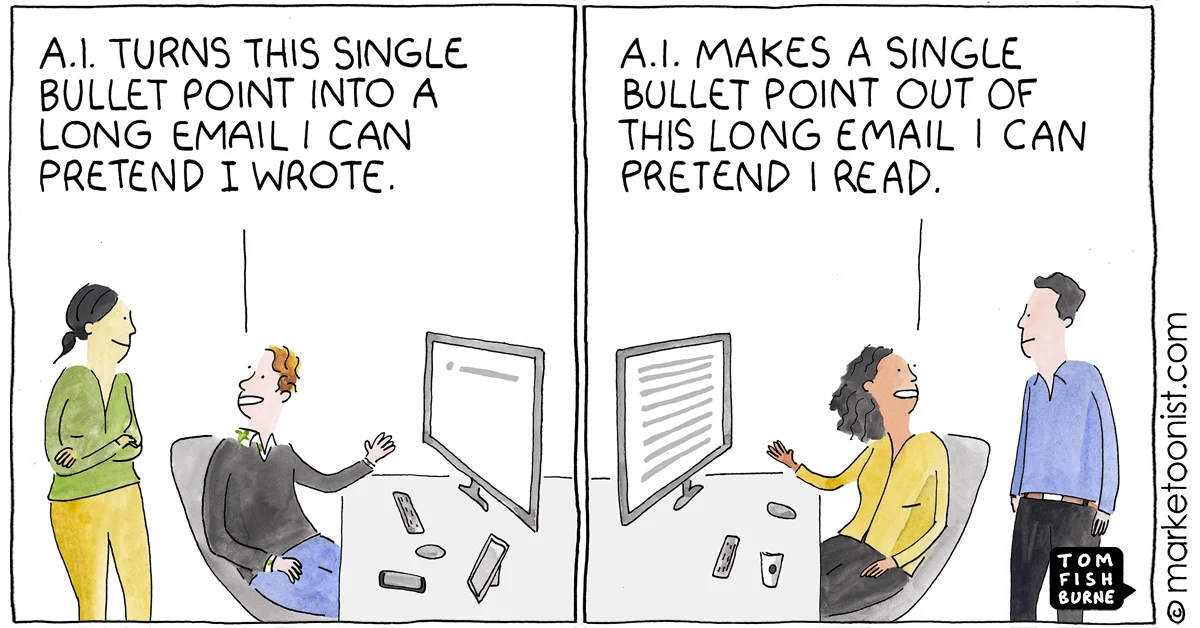
I've started hearing more people joke about having AI summarize the AI-generated docs, having Claude read the report that Claude wrote. Which is funny, and also a little terrifying, because when you remove human judgment from the loop entirely, you don't get more productivity. You get more volume at lower quality, which creates more work for everyone downstream.
So if personal AI agents are arriving and building is suddenly easy, the question isn't "what can I build?" It's "what's worth building?"
The seduction of making things
A few weeks ago, I walked my mom through building her first app. Right there on her iPhone, using Replit. No code. Just describing what she wanted in plain English.
She built a to-do list app, the Hello World of the modern software era.
And when it worked, when she saw the thing on her screen and realized she made that, this look came over her face. Pure joy. "I made that. Oh my gosh." She immediately wanted to patent it. "We need to protect this!" I was like, Mom, you and literally everyone right now. But it was really sweet 🥲
I know that feeling. I remember it from the first time I wrote a program as a kid: a number guessing game in BASIC. It felt like black magic. Something that didn't exist before now existed, and it was mine.
That feeling is deeply seductive. And I love that it's about to hit a lot more people as these tools get easier and more accessible.
The danger is that we confuse the thrill of making something with making something useful. Because in a world where the cost of building has collapsed toward zero, the scarce resource isn't code. It's discernment. Knowing what's worth your time and attention in the first place.
This connects to something I wrote about last week: the 10-80-10 framework. You bring the first 10% (perspective and framing). AI handles the middle 80% (research, drafting, building). You bring the last 10% (taste and quality). The trap of the personal agent era is trying to go 0-100-0. Handing the problem definition and the quality bar to AI, then wondering why the output feels hollow.
The era of personal software
This is happening at a bigger scale too. You might've seen the term "SaaSpocalypse" making the rounds. In the last few weeks alone, roughly $2 trillion in market cap has evaporated from the software sector. Salesforce down 26%. Adobe down 19%. Atlassian down 30%. The thesis is simple: if AI agents can do the work that software used to help humans do, why pay $15/seat/month for 30 different tools?
Satya Nadella predicted this back in late 2024 on the BG2 podcast. SaaS applications, he said, are basically CRUD databases with UI layers on top. That logic is migrating to the AI tier. The apps themselves are becoming irrelevant.
I think this is mostly right, and it's actually great news for individuals.
Because what it means is: you can now build incredibly niche software to solve your specific problems. Things that would never have justified a subscription app. Things that only matter to you. The cost of building is so low that a tool serving an audience of one is perfectly reasonable.
But here's the flip side. When you can build anything, it's easy to build everything. And that can feel overwhelming. Which brings us back to the same question: how do you choose what to build?
Put on your PM hat
In case you're new here: I'm Ron, a PM at Meta Quest. I've been building RonOS, a personal operating system based on Obsidian + Claude Code, as a way to stay sane in the AI era. It's the foundation for most of the experiments I write about.
Here's the mindset shift that's helped me the most: if you're going to build a personal AI assistant, approach it like a product manager.
Not in the "write a 12-month roadmap" sense. In the "do discovery before you build" sense.
Before you open VS Code or Claude Code or whatever your tool of choice is, get curious about your actual life:
- What feels repetitive?
- What feels scattered, like the data or context you need is spread across too many places?
- What's low-stakes but time-consuming?
- What decisions do you make repeatedly that could be better informed?
- What breaks every week in the same predictable way?
Then: pick one pain point. Build the smallest useful version. Run it for a week. If it sticks, invest more. If it doesn't, kill it without guilt.
The goal isn't to build a lot. The goal is to build a loop that actually changes your behavior. And if you're thinking "this just sounds like good product work"... yeah. That's the point. Product thinking is about to become one of the most important skills in the personal AI era, and it has nothing to do with being a PM by title.
Three loops that actually stuck
Out of everything I've experimented with, three integrations have genuinely changed my day-to-day. They share one trait: none of them started with "wouldn't it be cool if…" They all started with specific, recurring friction.
I want to walk through not just what I built but how I actually built it, because the process itself is part of the lesson.
Turning scattered health data into one picture
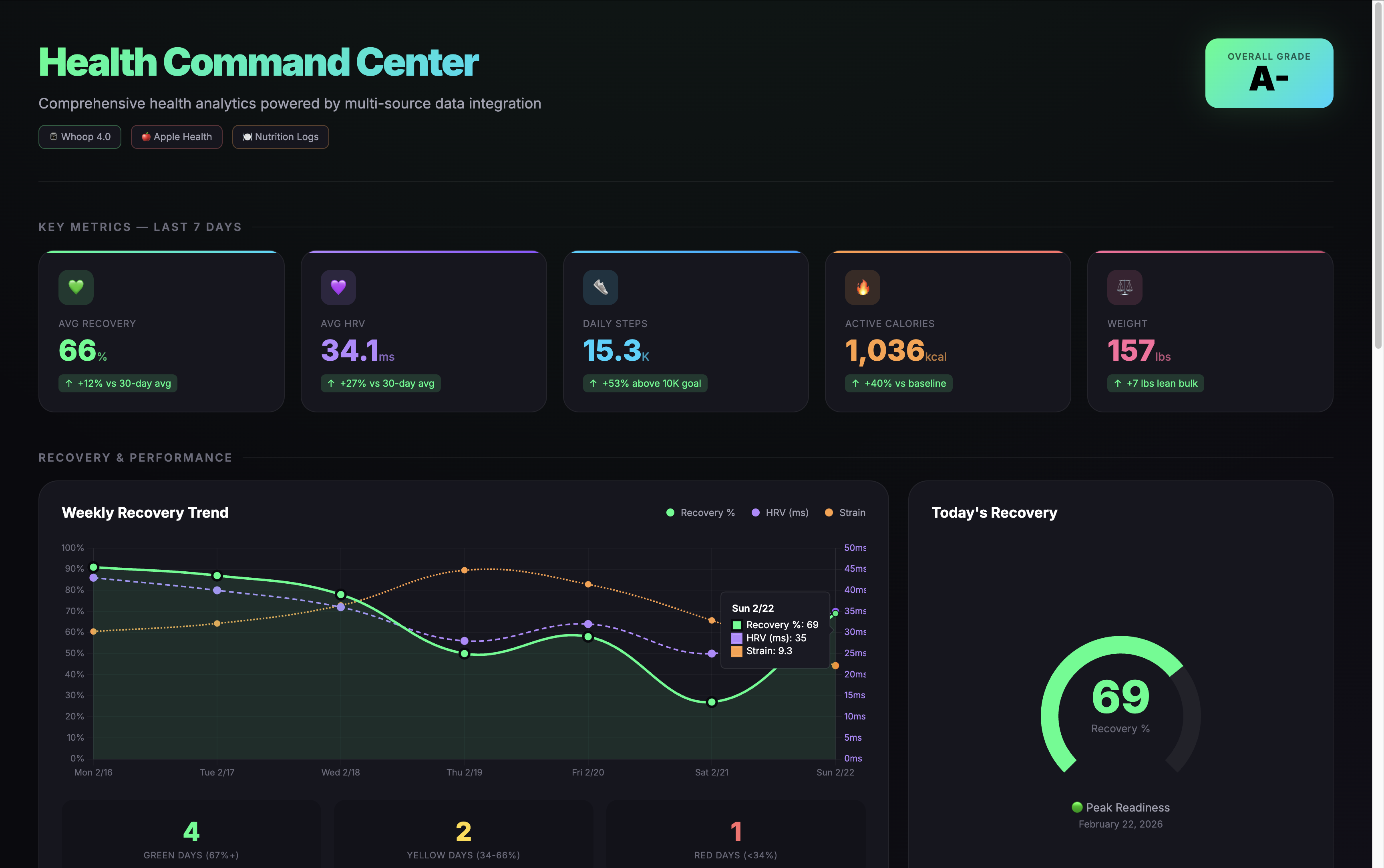
I was already collecting a ton of health data. Whoop for recovery and strain. Apple Health for steps and heart rate. Eight Sleep for sleep tracking. A smart scale for weight. The problem wasn't access to data. It was that the data lived in four different apps, and synthesizing it in my head was just enough friction that most days I'd skip it entirely.
So I opened Claude Code and said:
"I have health data spread across Apple Health, Whoop, and Eight Sleep. Can you help me build an integration that pulls key metrics from each and generates a daily summary?"
And then we started building. Part of the process was discovering constraints. I learned, for example, that Eight Sleep had disabled access to its public API. So that became a gap to work around. You learn by building, and some stuff doesn't work, and then you adapt and move on.
The result is a simple loop: the key metrics get pulled into my morning brief so I get one coherent picture of sleep quality, recovery, and activity, with one or two actionable insights.
The surprising outcome wasn't time saved. It was behavior change. When the brief tells me I slept well and the numbers back it up, I feel more motivated. I get more curious about what moves the numbers. That curiosity makes me more intentional about the habits that drive them. That's an outcome, not an output. And it all started with a simple question: "Why do I have all this health data but never actually look at it?"
Meal logging that meets me where I am
I don't want another app. I don't want to manually enter every ingredient into MyFitnessPal. But I do want to eat in a way that supports my goals.
So instead of trying to become the kind of person who tracks every macro perfectly, I built a loop that meets me where I already am. I'm at the grocery store wondering what to eat. I ask Claude. It suggests something that fits my nutritional targets. I ask what ingredients I need. I go home, I ask for the recipe. I cook it, I eat it.
Then instead of opening a food tracking app, I just tell Claude what I ate (or take a picture of it if I'm out) and it estimates the nutritional profile, logs it, and gives me a quick nudge. "You're low on protein today." "Drink more water."
The key piece that makes this work: I built a RonOS MCP server so that Claude can actually communicate with my knowledge base from my phone or tablet. That's how the meal data gets logged alongside everything else. It's not just a conversation that disappears. The data persists, and patterns emerge over time.
The prompt that kicked this off was something like:
"I want to track what I eat without using a food tracking app. Can you help me build a system where I just tell you what I had for a meal, you estimate the macros, and log it to my knowledge base? I want the data alongside my sleep and health stats so I can see patterns across all of it."
Is it perfectly accurate? No. Is it good enough to keep me honest and help me see patterns? Absolutely. And that's the bar.
Capturing ideas on the move
This one's small but it changed how I think about task management. I go on morning walks and ideas hit me. Things I need to do, stuff I want to write about, random thoughts. I used to either forget them or stop walking to type them into an app.
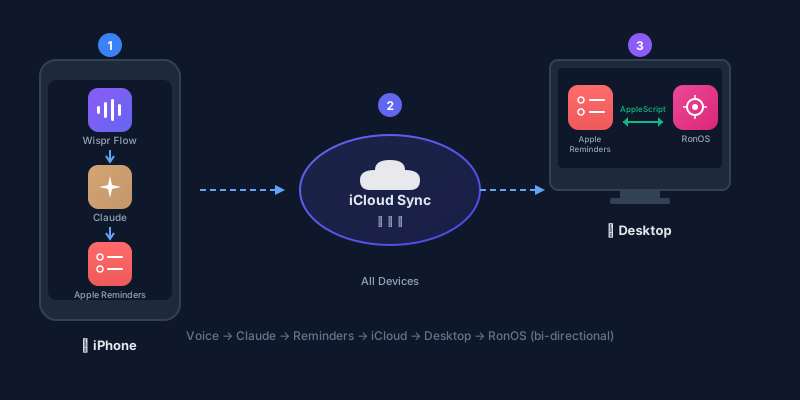
Now I just talk. I use voice dictation to capture thoughts as Apple Reminders. Then I asked Claude Code to write an AppleScript that watches for new reminders and imports them into my task management system inside RonOS.
The prompt was roughly:
"Can you write an AppleScript that monitors my Apple Reminders for new items and imports them into my Obsidian-based task management system?"
It sounds simple, and it is. But here's what makes it powerful: because my knowledge base already has context on my broader goals and priorities, it can help me figure out which of those captured thoughts actually matters and what to do about them. A random walk-and-talk idea gets ingested alongside my goals, my areas of responsibility, and my current projects. The system has enough context to help me prioritize.
The compound effect
Here's the thing that ties all of this together, and it's the part I didn't plan for.
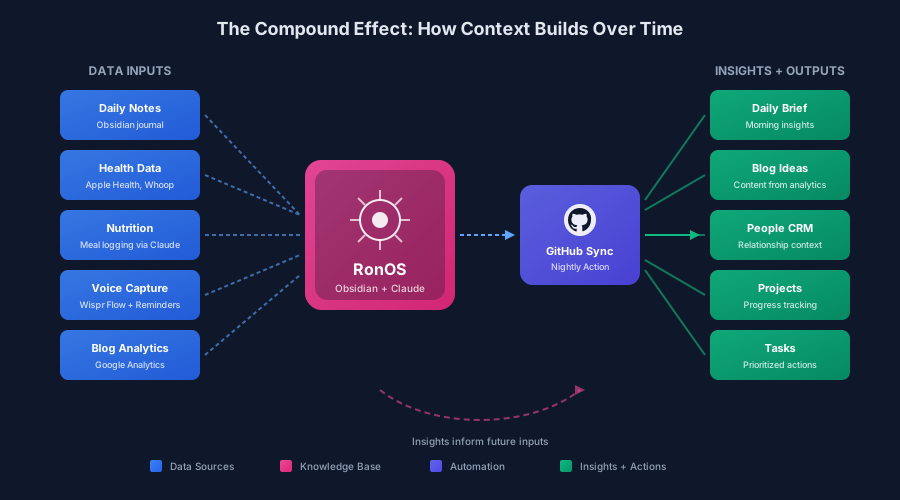
All of that health data is going into RonOS. The meal logging data is going into RonOS. The captured ideas from morning walks are going into RonOS. I'm also journaling most days, taking some time to collect and write my thoughts. All of it goes into the same place.
That context compounds over time. It builds into a comprehensive understanding of myself across multiple dimensions: health, work, relationships, lifestyle, personal growth. And because it's all in one place, I can aggregate across those dimensions and get insights that none of the individual data sources could provide on their own.
It's changing my behavior from day to day and week to week. Not because any single integration is that impressive on its own, but because they all feed into the same system and make each other smarter.
Coming full circle
I'll be honest. A lot of the experiments I've run haven't stuck. That's the part of building in public that's less fun to talk about. You try something, it doesn't quite work, you scrap it and try again. I've gone through several iterations of agent configurations that looked cool but didn't actually change my behavior.
What didn't work (so far):
- Eight Sleep integration: We went down a rabbit hole trying to integrate with Eight Sleep's documented API, only to discover it's no longer publicly accessible. I'm currently exploring community projects, but haven't cracked this one yet.
- MCP connector on mobile: Accessing RonOS from my phone or tablet via MCP hasn't been as reliable as I'd hoped. Claude Code just announced Remote Control, which could help. In the meantime, I've rebooted my OpenClaw setup for syncing health data on the go.
- Gmail/Calendar triage: Still a work in progress. I'd love to get to a point where AI helps triage incoming email and surfaces what needs action, integrating it into my task management. The pieces are there, but I haven't hit my stride yet.
But that process is how you develop taste for what works. And the OpenClaw news, the Steinberger acquisition, the Mac minis selling out, the SaaSpocalypse. All of it validates that this direction is real. Personal AI agents aren't a novelty. They're a platform shift.
As for me, I've just rebooted my own OpenClaw setup. It's running on a VPS for now. I haven't gone out and bought a new Mac mini yet, though I'm keeping an eye on the M5 announcements later this year. The difference this time is that I'm not starting with "what cool things can this agent do?" I'm starting with "what specific friction in my life does this solve?"
That's product thinking. And I think it's the skill that separates people who build things that actually improve their lives from people who build a lot of impressive demos that collect dust.
Where to start
If you're staring at a fresh OpenClaw install or a Claude Code terminal or any AI tool and wondering "now what?"... here's my suggestion.
Don't start with the tool. Start with your Tuesday.
What happened last Tuesday that was annoying, repetitive, or scattered? What information did you wish you had in one place? What task did you do for the fifteenth time that made you think "there has to be a better way"?
Start there. Build the smallest thing that solves it. See if it sticks.
You don't need a grand vision for your personal AI agent. You need one loop that works. The rest will follow.
Try this now: Open your second brain (Obsidian, VS Code, whatever you use) and capture one thing from last week that annoyed you in your personal or professional life. Write it in your daily note. That friction point is now raw material. You can use AI to brainstorm solutions, prototype fixes, and turn that frustration into your first loop.
If you want the technical side of how to set this up, I've written a couple guides:
- Build Your Personal AI Assistant with Claude Code
- Give Your Personal AI Assistant Hands Like OpenClaw (Without the Security Nightmares)
- The Degenerate's Guide to Vibe Coding (if you're brand new to building with AI)
- Something Big Is Happening (the 10-80-10 framework referenced above)
I'm documenting what works (and what I kill) as I build in public. Join the newsletter for the honest version, or find me on LinkedIn and X. I'd love to hear what loops you're building. Tell me what friction point you started with.
Get the Obsidian + Claude Code starter vault. Coming soon
The setup I use to run my life — MCP servers, daily briefs, templates. Free when you subscribe to The Degenerate.
You're a Designer Now
I rebuilt ronforbes.com in an afternoon using Claude Design and Claude Desktop. The tools changed. The agency was always yours. Here's what I learned.
You Don't Have to Wait for KAIROS
A leaked Claude Code daemon called KAIROS and Karpathy's viral knowledge base blueprint just revealed the future of personal AI. Here's what's actually working today, and how to start building it this weekend.
The Week the Proactive AI Assistant Went Mainstream
Claude shipped computer use, Dispatch, Channels, and scheduled tasks in eight weeks, replicating what previously required OpenClaw and a self-hosted server. Here's what changed and how to set it up.
Your Second Brain Is Not Optional Anymore
AI didn't create the information overload problem, it made it impossible to ignore. Here's how to build a personal AI second brain using Claude Cowork or Claude Code in a single day, whether you're technical or not.