The Week the Proactive AI Assistant Went Mainstream
Claude shipped computer use, Dispatch, Channels, and scheduled tasks in eight weeks, replicating what previously required OpenClaw and a self-hosted server. Here's what changed and how to set it up.


Something shifted this week. Not just in AI Twitter discourse or Hacker News threads, but in what's actually possible for the average knowledge worker sitting at a laptop.
TL;DR: Claude shipped computer use, Dispatch, Channels, and a wave of features that replicate what OpenClaw does, the always-on AI agent framework I've been writing about for months. The proactive AI assistant is no longer a DIY project for developers. It's a product you can use today. Here's what happened and what it means for how you work.
I've been building my own AI assistant setup since late 2025. First with Claude Code and Obsidian. Then with scheduled automations via GitHub Actions. Then, more recently, by comparing everything to OpenClaw, the open-source agent framework that showed what a truly proactive AI assistant could look like.
This week, I watched most of that gap close in real-time.
Why This Week Matters (and Not Just for AI Nerds)
Let's zoom out for a second.
92% of US-based developers now use some form of AI-assisted coding. That number was basically zero two years ago. The global AI-assisted coding market is projected to hit $8.5 billion this year. Vibe coding, the thing I've been writing about as a non-engineer who builds with AI, went from niche to near-universal. It's not even called vibe coding anymore in most engineering orgs. It's just agentic engineering, and it's the default way software gets built.
But here's the part that doesn't get enough attention: the same shift is about to happen for knowledge work more broadly.
Most people still use AI the same way they've used it since ChatGPT launched: open a chat window, type a question, get an answer, close the tab. It's reactive. It's manual. It's a fancier search engine.
The proactive AI assistant is fundamentally different. It doesn't wait for you to ask. It checks your calendar and surfaces prep notes before your next meeting. It processes your meeting transcripts and flags action items. It monitors your inbox and drafts responses. It runs on a schedule, in the background, while you're focused on the work that actually requires your judgment.
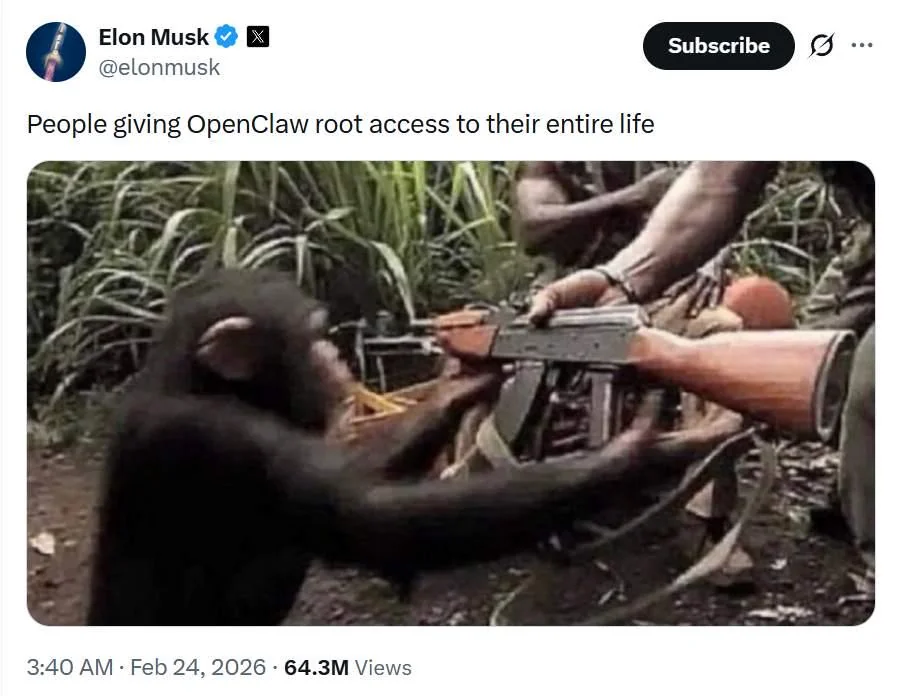
OpenClaw was essentially a time machine. It gave a small number of highly technical people an early glimpse of what the future of knowledge work would feel like. A proactive AI that actually works alongside you, not just answers your questions. That's why the people who got it running were so vocal about it. They'd seen the future. But it required you to self-host, manage infrastructure, and accept some real security risks (I've written about those here).
This week, Claude arrived at that same future and made it accessible to anyone with a subscription.
The Rapid-Fire Month
Here's what Anthropic shipped in the span of about eight weeks, with the pace accelerating dramatically in March:
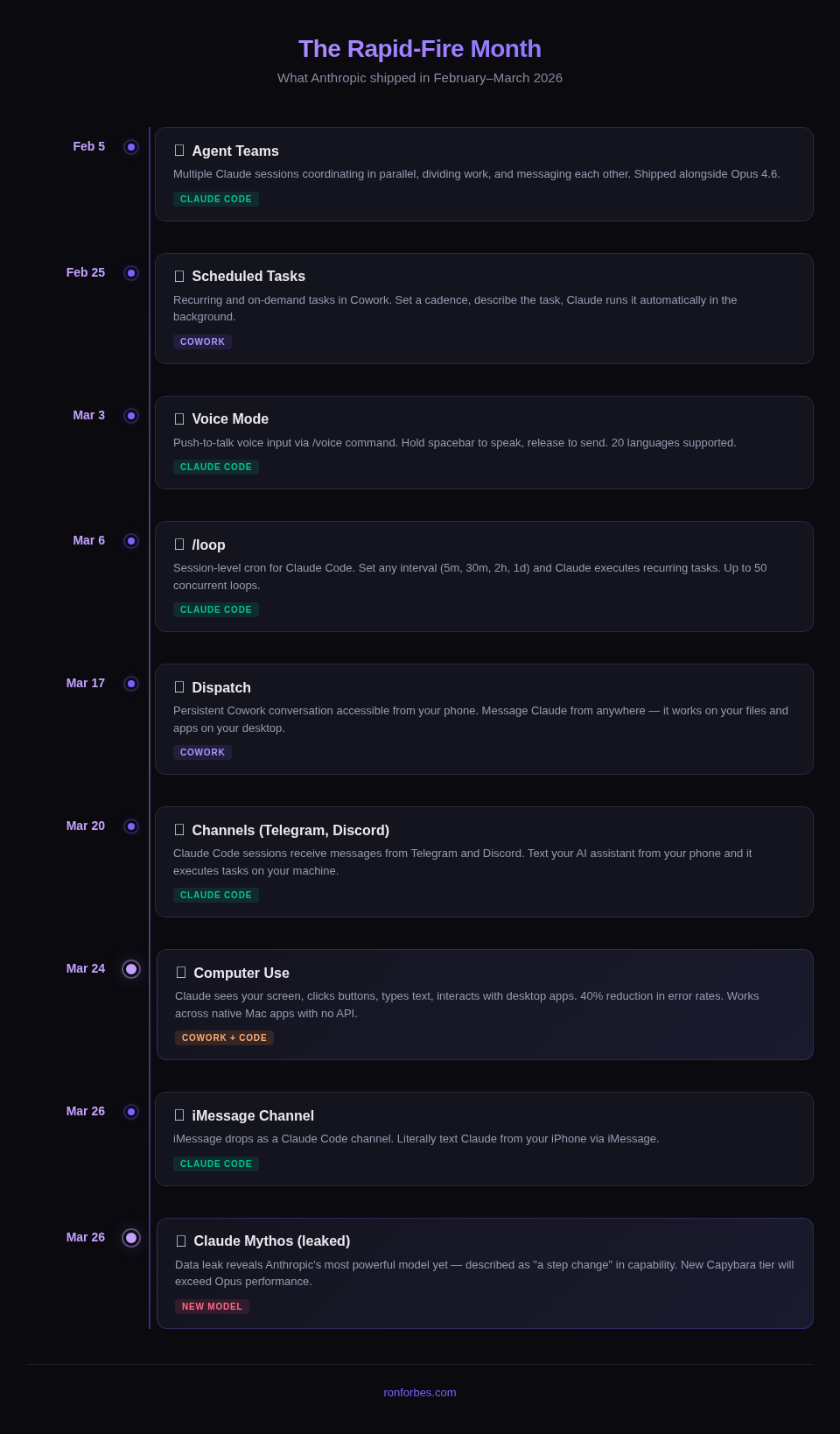
Agent Teams (February 5). This is the one that made me sit up. Instead of one Claude session doing everything sequentially, you can now spin up multiple sessions that coordinate, divide work, and message each other. I've been using this to parallelize research tasks that used to take forever. It's early and experimental, but the trajectory is clear: your AI assistant is becoming a team.
Scheduled Tasks (February 25) + /loop (March 6). This is the Heartbeat equivalent I've been waiting for. Before this, Claude only worked when you were actively talking to it. Now you can set it to check your inbox every morning, process meeting notes at end of day, or flag calendar conflicts before you wake up. The fact that this shipped for both Cowork (via the UI) and Claude Code (via /loop in the CLI) means both technical and non-technical users got this at the same time.
Voice Mode (March 3). Small feature, big quality-of-life upgrade. I personally use Wispr Flow and Superwhisper for voice input (I've written about why), but the underlying point is the same: talking in stream-of-consciousness is one of the highest-leverage ways to provide deep context to your AI. Your spoken brain dump is richer, more natural, and more you than a carefully typed prompt. If you're not using voice dictation with your AI assistant yet, start here.
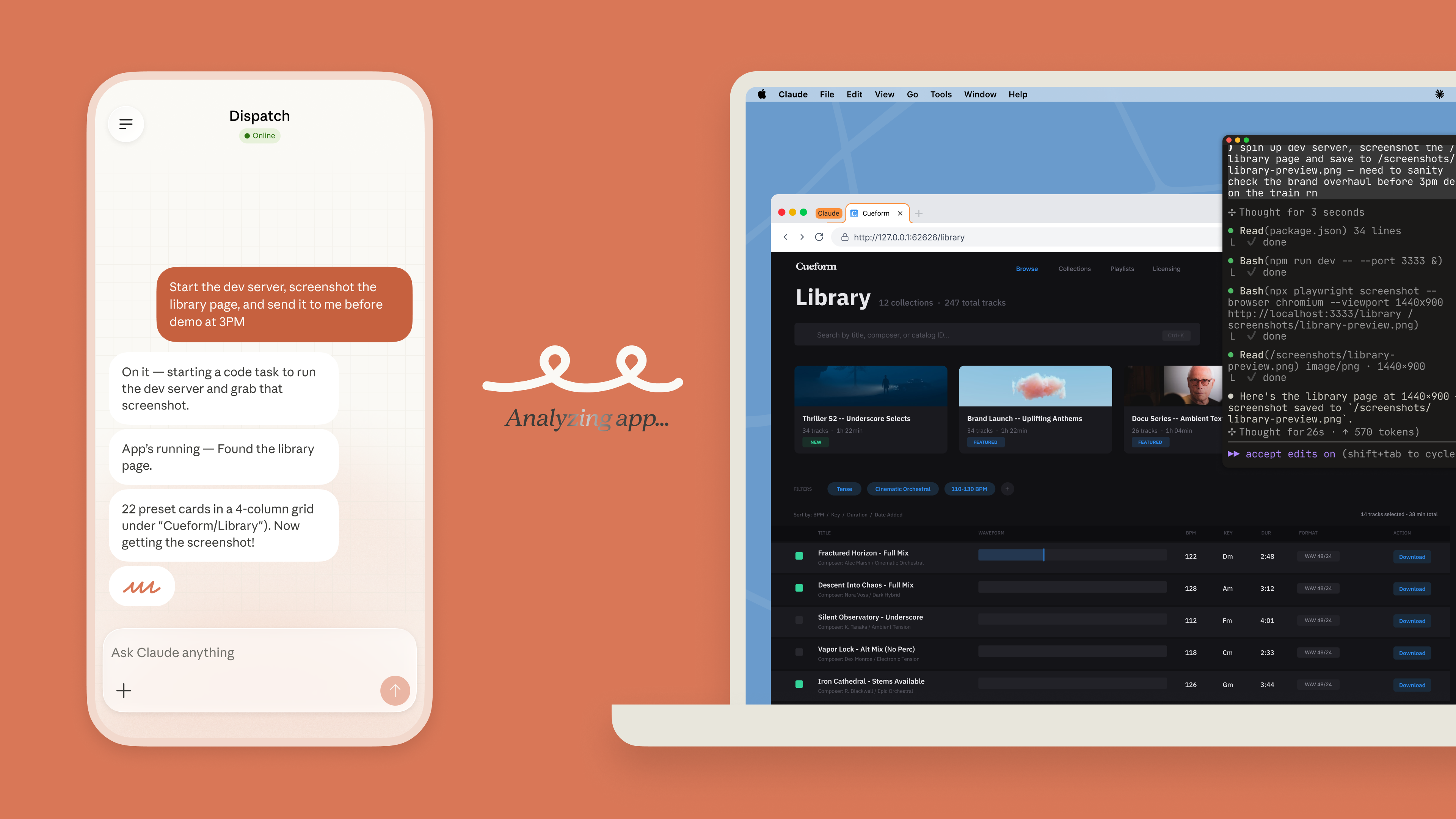
Dispatch (March 17). A persistent Cowork conversation that you can access from your phone. This is Claude's equivalent of the always-available messaging layer that made OpenClaw feel like a real assistant. You message Claude from anywhere (your phone, your tablet) and it works on your files and apps on your desktop. This has become my primary way of interacting with Claude when I'm away from my computer.
Channels (March 20-26). Claude Code sessions can now receive messages from Telegram, Discord, and as of March 26, iMessage. You can literally text Claude from your iPhone and have it execute tasks on your machine. This is Anthropic's direct answer to OpenClaw's Gateway, the message routing layer that receives inputs from 30+ platforms.
Computer Use (March 24). This is the big one. Claude can now see your screen, click buttons, type text, and interact with desktop applications, in both Cowork and Claude Code. Not as a demo. Not as a research preview. As a shipping feature for Pro and Max subscribers. What makes this matter: most of the apps we use every day don't have APIs. There's no way to programmatically interact with Apple Photos, or System Settings, or that one internal tool your company built. Now there is. I've been using it to automate workflows that would have required custom integrations before, and it just... works.
Claude Mythos (leaked March 26). A data leak revealed Anthropic is testing what they describe as "a step change" in AI capability. Details are sparse, but Fortune reported it alongside mention of a new model tier called Capybara that will exceed Opus performance. The leaks suggest the ceiling on what these assistants can do is about to jump again.
It's a lot. And each of these features maps directly to a piece of infrastructure that previously required OpenClaw or a custom setup to achieve.
From OpenClaw to Claude: The Gap Closes
If you've been following my writing, you know I've been tracking OpenClaw closely. The framework popularized the idea of a five-pillar AI assistant architecture: Gateway (message routing), Brain (reasoning loop), Memory (persistent context), Skills (specialized actions), and Heartbeat (proactive scheduling).
I'm not going to rehash what OpenClaw is. I've covered that in previous posts. Instead, here's the honest comparison of where things stand today.
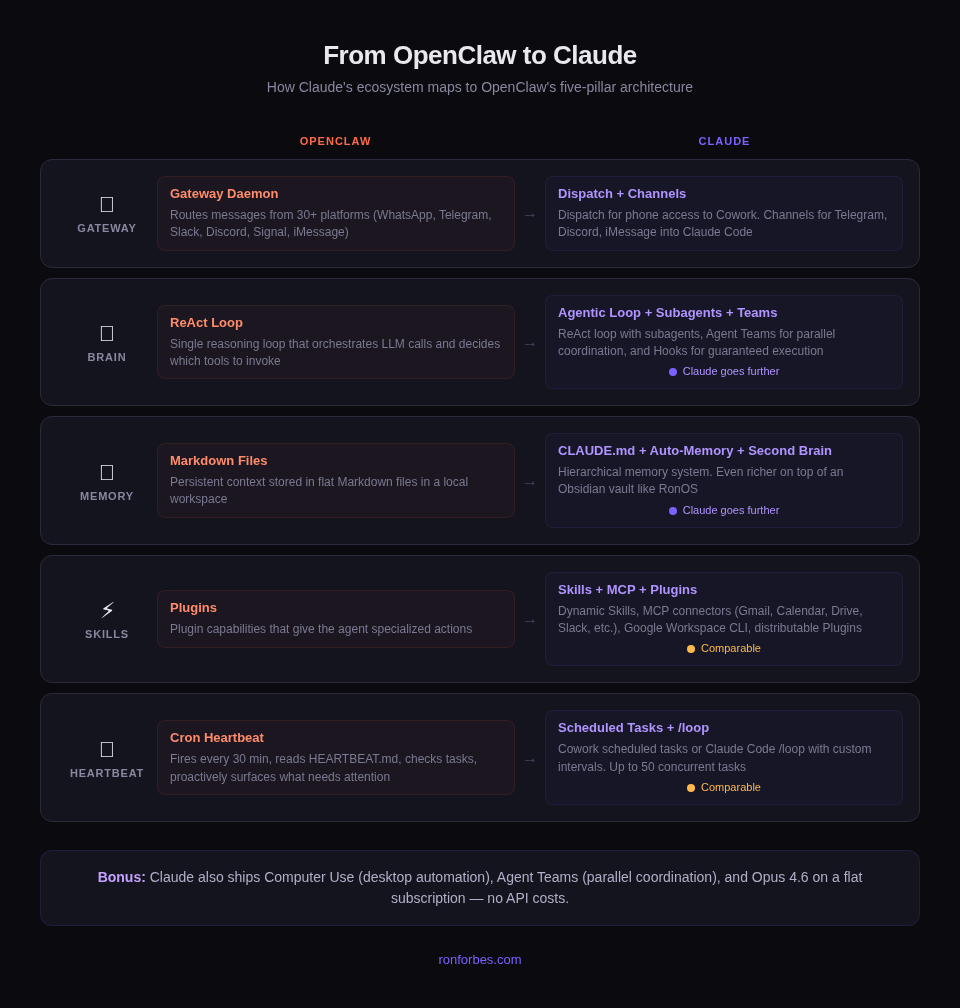
Gateway → Dispatch + Channels. OpenClaw routes messages from 30+ platforms through a central daemon. Claude now has two equivalents. Dispatch is a persistent Cowork conversation you can access from your phone, meaning you can communicate with your AI assistant from anywhere, not just while sitting at your laptop. Channels add Telegram, Discord, and iMessage as direct inputs to Claude Code sessions.
The key unlock here is the phone-to-desktop connection. When I'm walking around New York City, I can use Dispatch to reach my computer at home and have Claude working for me in the background. Combine that with computer use, and things get wild: I can message Claude from my phone, have it wake my Mac, dig through my Downloads folder to find a file, and send it to a friend on my behalf. All while I'm out grabbing coffee. It feels like having a living, breathing assistant that lives inside your computer. The coverage isn't as broad as OpenClaw's 30+ platform integrations, but it hits the platforms most people actually use daily.
Brain → Claude's Agentic Loop. Both use a ReAct-style reasoning loop that decides what tools to invoke and chains actions together. Claude goes further here with subagents (specialized child processes), Agent Teams (multiple sessions coordinating in parallel), and Hooks (deterministic scripts that guarantee execution at lifecycle events). OpenClaw runs a single brain. Claude can run a squad.
Memory → CLAUDE.md + Auto-Memory. OpenClaw stores persistent context in flat Markdown files. Claude does the same thing with its auto-memory system and CLAUDE.md hierarchy (global preferences, project-level, module-specific). And if you're running this on top of a second brain (an Obsidian vault like my setup, RonOS), your memory layer becomes significantly richer than what OpenClaw offers out of the box. We're talking 2,000+ linked notes with areas, projects, daily notes, and goals, all in Markdown that Claude can read and write natively.
Skills → Claude Skills + MCP. OpenClaw has plugin capabilities. Claude has Skills (folders with a SKILL.md file that Claude loads dynamically) plus MCP servers for external integrations like Gmail, Google Calendar, Google Drive, Slack, Spotify, Vercel, Google Analytics, and dozens more. One that's been particularly powerful for me is the Google Workspace CLI plugin, which gives Claude quick access to a bunch of Google services in one bundle. Plugins let you package and distribute these integrations as shareable units.
Heartbeat → Scheduled Tasks + /loop. This was the biggest gap, and it just closed. OpenClaw's Heartbeat fires every 30 minutes, checks a task list, and proactively surfaces things that need attention. Claude's Scheduled Tasks (in Cowork) and /loop command (in Claude Code) do the same thing. Set a cadence, describe the task, and Claude runs it automatically.
Two Paths: Pick Your Speed
Here's what I think is interesting about what Anthropic is doing: they're offering two paths to the same destination.
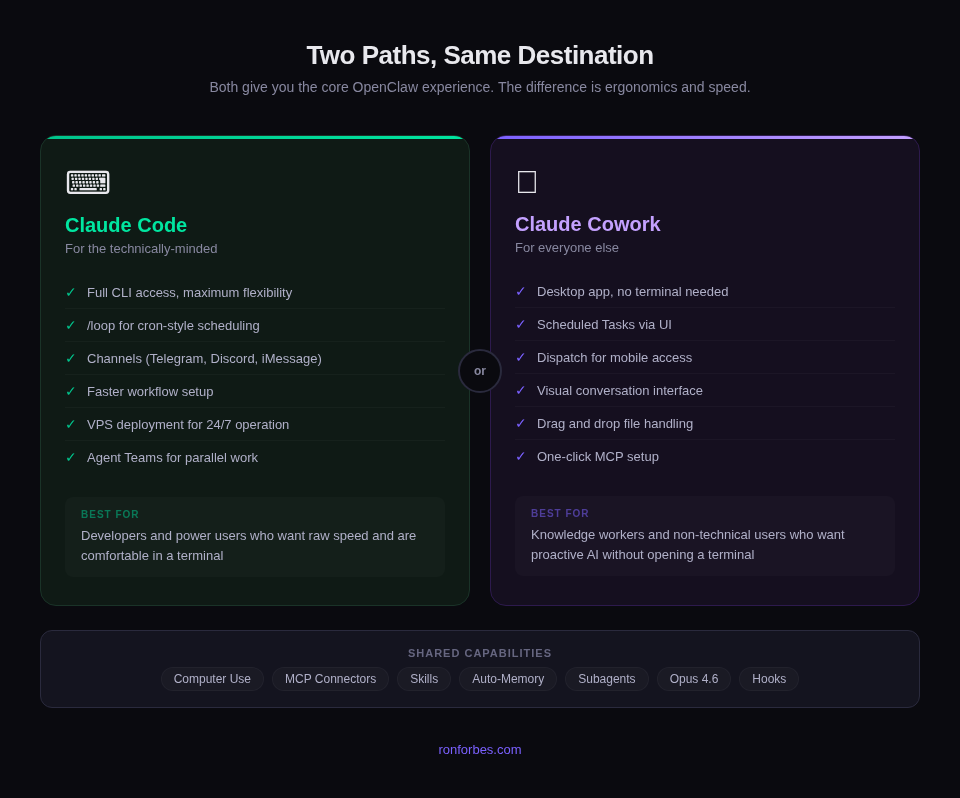
Claude Code is for the technically-minded. You get raw speed, full CLI access, and maximum flexibility. If you're comfortable in a terminal, you can set up /loop 30m check my calendar and inbox, flag anything that needs attention and have a proactive assistant running in minutes. Add Channels and you can text it from your phone. The speed difference is noticeable. I can spin up complex workflows in Claude Code significantly faster than in Cowork.
Claude Cowork is for everyone else. No terminal required. You get the same underlying capabilities (computer use, scheduled tasks, MCP connectors, Skills) wrapped in a desktop app with a conversation interface. It's slower for power users, but it makes proactive AI accessible to people who would never open a terminal. That's a massive expansion of who can benefit from this.
Both paths give you the core OpenClaw experience. The difference is ergonomics and speed, not capability.
I'm documenting my full setup as I build it, including the configs, the MCP connectors, and the workflows that actually stick. Subscribe to The Degenerate to follow along.
Where OpenClaw Still Wins
I'm building in public, so I'll be honest about the gaps.
Dispatch still feels new. This is the big one for me right now. When I message my OpenClaw instance over Telegram, it starts responding within a few seconds. With Dispatch, I'm often staring at a loading spinner for a minute or more before I get any response. Sometimes I'm left wondering if it's working at all. The responsiveness gap is real and noticeable in daily use.
Voice input isn't there yet. OpenClaw over Telegram has seamless voice integration: you leave an audio message, it gets transcribed and processed like text. With Dispatch, I've been trying to use Wispr Flow on iOS and it feels clunky compared to how natural the Telegram voice experience is. Maybe I just haven't found the right workflow yet, but right now, talking to OpenClaw feels frictionless in a way that talking to Dispatch doesn't.
True 24/7 operation. Cowork's scheduled tasks only run when your Mac is awake and Claude Desktop is open. OpenClaw runs on a server, always on. You can replicate this by running Claude Code on a VPS in a tmux session for $5-10/month, but that's back to "requires technical setup" territory.
Broader messaging platform support. OpenClaw's Gateway connects to 30+ platforms out of the box. Claude's Channels currently cover Telegram, Discord, and iMessage. If you need WhatsApp, Signal, or other platforms as inputs, OpenClaw has the edge.
Community ecosystem. OpenClaw has an active open-source community building and sharing agent configurations. Claude's ecosystem is growing fast (MCP hit 97 million monthly SDK downloads this month), but the ready-made "agent templates" scene is more mature on the OpenClaw side.
That said, these gaps are narrowing week by week. And for most knowledge workers, the Cowork path covers 80-90% of the value without the security risks or infrastructure management.
My Setup Right Now
Here's what I'm running as of this week:
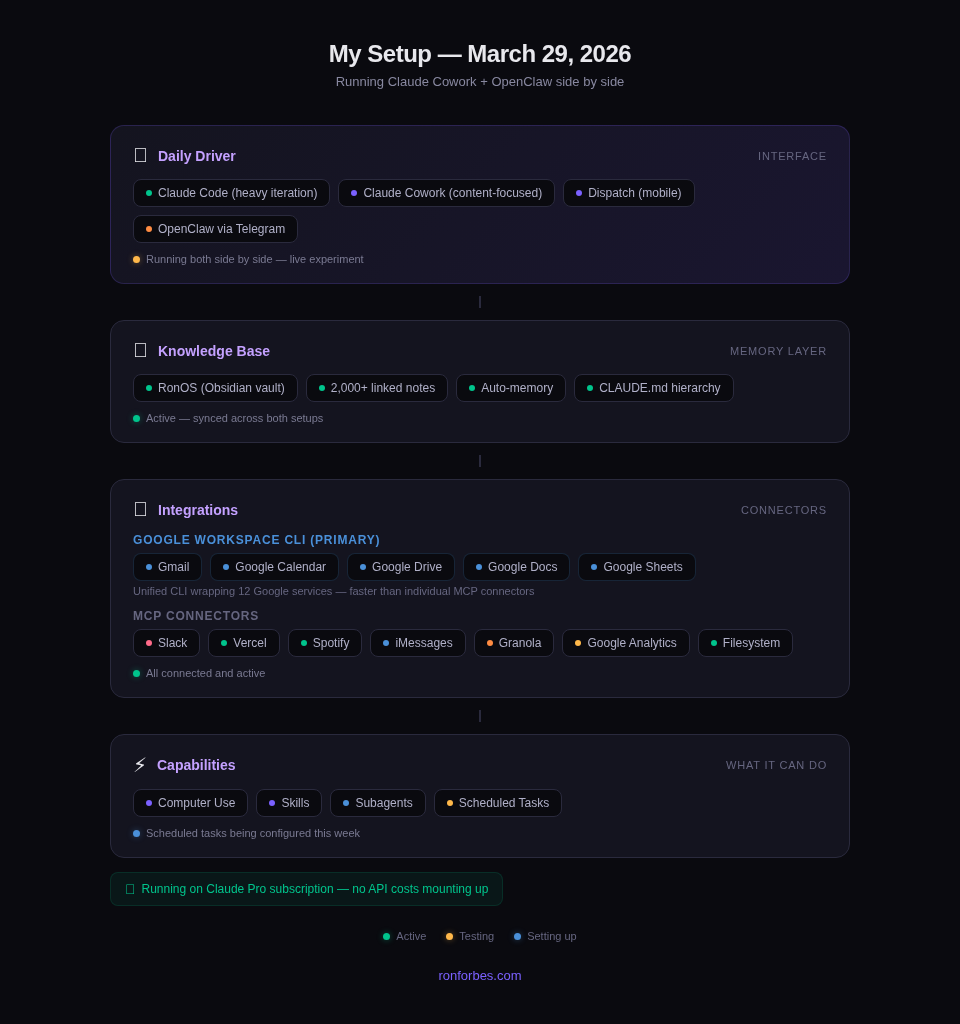
Daily driver: Claude Code + Claude Cowork with Dispatch. I use Claude Code for heavy iteration and rapid development workflows because it's significantly faster. I use Cowork when I'm in a more content-focused mode, like blog writing and research. This post was largely researched through back-and-forth conversation with Dispatch while I was out and about over the weekend. When I sat down at my desk, I transitioned into Cowork to finish up the research, build the outline, and collaboratively draft what you're reading now.
Knowledge base: RonOS, my Obsidian vault with 2,000+ linked notes. Claude reads and writes to it directly. Auto-memory persists context across conversations.
Integrations: Google Workspace CLI has been a game-changer. It's a unified CLI that wraps 12 Google services (Gmail, Calendar, Drive, Docs, Sheets, and more) into one tool, and it's faster than connecting individual MCP servers for each. Beyond that, I've got MCP connectors for Slack, Vercel, Spotify, iMessages, Granola (meeting transcripts), Google Analytics, and filesystem access.
Computer use: Enabled. I've been using it to navigate native Mac apps and automate workflows that don't have APIs.
Scheduled tasks: Setting these up this week. Daily briefings, inbox processing, and calendar prep.
Still running OpenClaw too. Full transparency: I haven't switched completely. I've been running OpenClaw for several weeks now. I'm used to the daily briefs and proactive check-ins it sends me. OpenClaw is connected to a clone of my RonOS knowledge base, and I'm keeping both in sync while I test them side by side. I'm not ready to declare a winner yet. This is very much a live experiment.
One big win for Claude: cost. With OpenClaw, I'm paying API costs per token, and the usage is mounting up. It's getting to the point where the API bill is a real concern. With Claude, I'm using my Pro subscription and so far haven't hit usage limits. Being able to run Opus 4.6 on a flat subscription fee instead of watching API costs rack up is a meaningful advantage, especially if you're running a proactive assistant that's checking in throughout the day.

The Bigger Picture
Here's what I keep coming back to: the proactive AI assistant is no longer a project. It's a product.
Six months ago, getting this kind of setup required OpenClaw, a VPS, Docker, API keys, and a tolerance for security vulnerabilities. Today, you can get most of the way there by subscribing to Claude and spending an afternoon configuring Skills and MCP connectors.
The 92% of developers using AI-assisted coding? That's about to be matched by knowledge workers using AI-assisted everything else. Not because the tools got smarter (though they did, and Mythos is coming). But because the tools got accessible.
If you're a technical person who's been curious about OpenClaw but put off by the infrastructure: Claude Code gives you the same architecture with less overhead.
If you're a non-technical person who's been watching the AI agent hype from the sidelines: Claude Cowork is your on-ramp.
Either way, the era of the reactive chatbot is ending. The proactive assistant is here.
Want to try this yourself? Start with a Claude Pro subscription, install the Google Workspace CLI plugin, and connect one MCP server (Gmail or Google Calendar are good first picks). You'll have a proactive assistant running within an afternoon. I'll be writing a full setup walkthrough soon.
Building in public: I'm documenting this whole journey: the experiments, the setups, the things that don't work. Subscribe to The Degenerate to follow along.
Previous posts in this series:
- Give Your Personal AI Assistant Hands Like OpenClaw
- Stop Learning AI. Start Learning Management.
- Claude Code as Life Coach: My Obsidian AI Setup
Find me elsewhere:
This post was researched via Dispatch while walking around NYC, then outlined and drafted collaboratively in Claude Cowork. All text is my own, with AI-assisted research and editing.
Get the Obsidian + Claude Code starter vault. Coming soon
The setup I use to run my life — MCP servers, daily briefs, templates. Free when you subscribe to The Degenerate.
You're a Designer Now
I rebuilt ronforbes.com in an afternoon using Claude Design and Claude Desktop. The tools changed. The agency was always yours. Here's what I learned.
You Don't Have to Wait for KAIROS
A leaked Claude Code daemon called KAIROS and Karpathy's viral knowledge base blueprint just revealed the future of personal AI. Here's what's actually working today, and how to start building it this weekend.
Your Second Brain Is Not Optional Anymore
AI didn't create the information overload problem, it made it impossible to ignore. Here's how to build a personal AI second brain using Claude Cowork or Claude Code in a single day, whether you're technical or not.
Stop Learning AI. Start Learning Management.
The most important skill for working with AI agents isn't technical. It's people management. How frameworks from Julie Zhuo and Kim Scott transformed my AI workflows.